QuoteIQ: Field Service CRM
- 4.4
- Rating
- 10.00K
- Installs
- Free
- Price

 Analysis by App-foxy
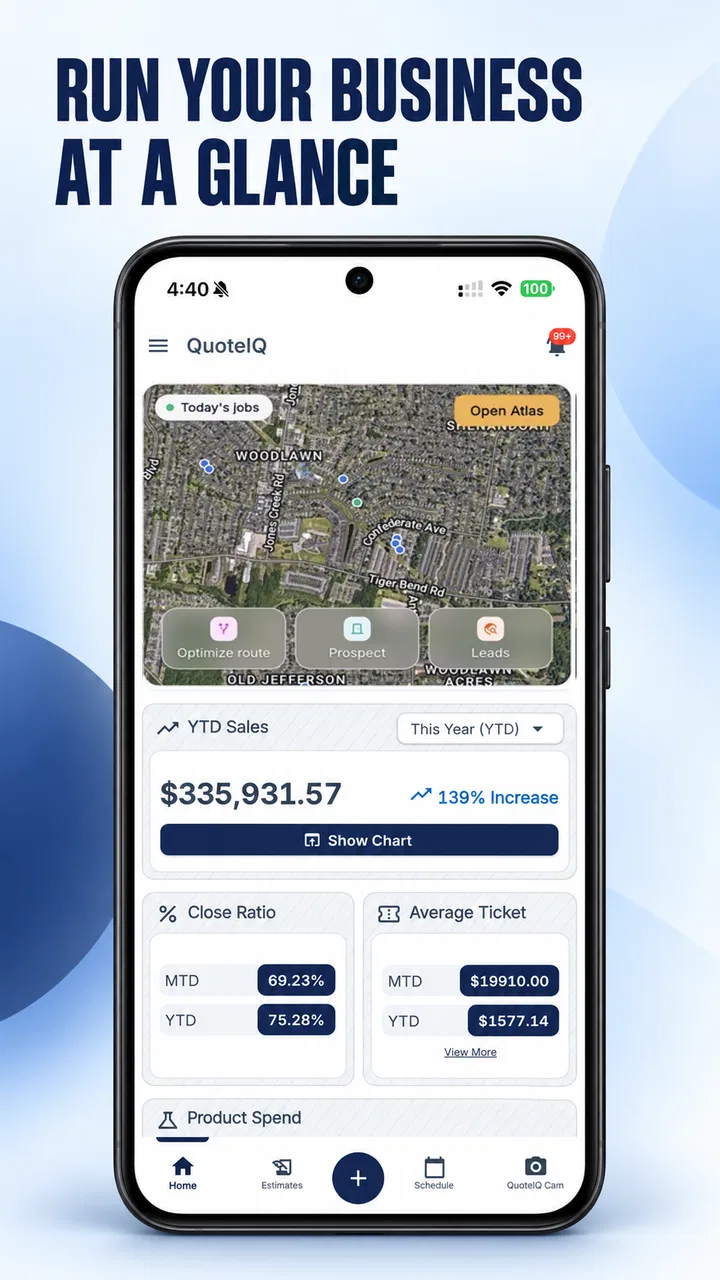
Running a service business usually means switching between several jobs before lunch: answering a new enquiry, preparing an estimate, checking tomorrow’s appointments, sending an invoice, and remembering which customer still needs a follow-up. QuoteIQ: Field Service CRM is designed to bring those tasks into one mobile workspace for service professionals. I approached it less as a simple quoting tool and more as a practical test of whether a small team can keep customer and job information organized without building a complicated office system.
My overall impression is that QuoteIQ makes the most sense when your work already revolves around estimates, scheduled visits, customer communication, and payment collection. It is not merely a digital notepad for field technicians. The useful question is whether its combined workflow saves enough back-and-forth to justify learning another business app. For a solo operator or a growing service company, that answer can be yes, particularly when the phone is the main computer used during the working day.
How QuoteIQ fits into a real service-business day
I find QuoteIQ most useful when I judge it against the rhythm of an actual service day, not just its individual tools. A job often moves from an enquiry to a price, a visit, and billing, and each handoff is a chance for details to get lost. Thinking through that sequence helps me see where a connected workflow could reduce mental bookkeeping—and where a team’s own habits still matter.
You May Also Like

 AccuWeather: Weather Radar
AccuWeather Review: A Quick, Clear Forecast for Everyday Decisions
For everyday plans, the best forecast is the one you can understand quickly. AccuWeather makes rain timing, radar, and local conditions easy to act on, with a few trade-offs.

 Hill Climb Racing
Why Hill Climb Racing Still Turns Crashes Into One More Run
A tiny car, a bumpy hill and one more upgrade: Hill Climb Racing keeps resurfacing because its simple chaos makes every near-miss feel personal.

 AliExpress - Shopping App
AliExpress Makes Global Shopping Feel Personal, but Shoppers Bear the Risk
AliExpress turns a global marketplace into a pocket-sized discovery engine. Its reach is useful, its shopping loop compelling, and its trade-offs easy to miss.

 Lords Mobile: Kingdom Wars
Lords Mobile Is a Kingdom-Building Routine, Not a Quick Match
A case-by-case verdict on the building, battles, device demands, and social commitments that make Lords Mobile rewarding for some players and exhausting for others.

 PDF Scanner app - TapScanner
TapScanner Makes Paperwork Easier to Capture, Check, and Share
TapScanner makes scanning with a phone feel less like a rescue operation and more like a dependable step in getting work done. Its capture tools are useful, though not flawless.

 Block Blast!
Block Blast! Shows How Much a Puzzle Game Can Leave Out
A quiet grid game shows why puzzle players increasingly value instant clarity, repeatable skill and low-pressure play—and where the genre still needs to catch up.
More From Our News Desk
View All News


A practical starting point for estimates and customer records
The app comes from QuoteIQ and sits in the Business category. Its core appeal is the connection between a prospective job and the work that follows. Instead of treating an estimate as an isolated document, I found the concept more useful when viewed as the first step in a customer record: capture the request, prepare the price, arrange the visit, and continue the conversation from the same general workflow.
That approach is especially relevant for businesses such as cleaning, landscaping, painting, pressure washing, repairs, and other appointment-based services. These companies often lose time not because the individual tasks are difficult, but because details are scattered across text messages, paper notes, calendars, and separate invoicing tools. A unified CRM can reduce that fragmentation, although it does require the owner and staff to consistently enter information in one place.
In a realistic morning scenario, I would use QuoteIQ to review the day’s scheduled work, open a customer record before arriving, and check the context behind the visit rather than relying on memory. After completing the job, the next useful step is preparing an invoice while the details are fresh. If a new enquiry arrives between appointments, an estimate workflow can keep it from disappearing into an unread message thread. The value is not one spectacular feature; it is the continuity between these small actions.
That continuity also changes how a business thinks about follow-up. A quote that has been sent but not accepted should not be treated like a finished task. It represents a possible job that may need attention later. Keeping the estimate connected to the customer and scheduling process gives the owner a better chance of seeing unfinished opportunities during normal work rather than reconstructing them at the end of the week.
What the mobile format gets right
For field work, a phone-first design is important. A system that only feels comfortable at a desk becomes inconvenient the moment a technician is standing outside a customer’s property. QuoteIQ’s purpose is clearly tied to that mobile reality: the person doing the work can handle business administration close to the job instead of waiting to return to the office.
I would still recommend setting aside time for initial setup. A CRM becomes useful only when customer names, job details, estimates, appointments, and invoices are entered consistently. If every employee creates records differently, the combined system quickly becomes as confusing as a collection of notebooks. Establishing simple internal habits—one format for customer names, clear job descriptions, and immediate status updates—will matter as much as the app itself.
One non-obvious benefit is the reduction of “where did I put that?” moments. A field operator may remember the property but not the exact scope of work, the agreed price, or whether payment has already been requested. A connected workflow gives the business a chance to check the relevant stage before speaking with the customer. That can make conversations sound more professional without requiring a large office staff.
Trust begins with visible control, not just convenience
Because the app can sit close to customer, job, scheduling, and billing information, I would not judge it only by how quickly it creates an estimate. Trust depends on whether the person using it understands what is being entered, what is being shared with teammates, and which actions affect the customer. The safest way to use a tool like this is to treat every customer record as business information that deserves deliberate handling.
I look for clear moments where the user can review details before sending an estimate or invoice, correct an address, and decide whether a record is ready for the next stage. Those checks are more important than flashy automation. A wrong price or outdated appointment can damage a relationship even if the app performs the workflow perfectly.
Account management also deserves attention during onboarding. A business owner should know which login belongs to the company, who is allowed to use it, and what happens when a worker leaves. I would avoid sharing one account across an entire crew because shared credentials make it harder to understand who changed a job or sent a document. Individual access, where available within the chosen plan and setup, is a better operational habit than passing around one password.
Permissions and data-sensitive moments
My cautious approach is simple: grant only the device access that is needed for the task in front of you, and read each permission prompt instead of accepting everything automatically. A service CRM can involve sensitive business context, including customer contact details, addresses, job descriptions, and financial documents. Those details should be handled with the same care as paper records kept in an office.
The most sensitive moments occur when creating a customer, attaching job information, preparing an estimate, and issuing an invoice. Before saving, I would check spelling, contact details, service scope, taxes or charges that apply to the job, and the intended recipient. Small errors become harder to correct once a document has been sent or a customer has acted on it.
There is also a practical privacy issue when using the app in public places. A technician may open a customer record in a vehicle, at a counter, or while standing near other people. A screen lock, careful notification settings, and avoiding unnecessary discussion of customer details in public are sensible habits regardless of the software. QuoteIQ can organize information, but it cannot replace basic privacy discipline.
Before committing a whole team, I would review the app’s current privacy and account documentation directly inside the relevant store or service materials, then compare it with the company’s own obligations. That is particularly important for businesses handling access details, property information, recurring service arrangements, or payment-related records. I would not assume that a convenient workflow automatically matches every company’s retention or compliance needs.
Where user agency matters most
The app is strongest when it helps a person make a decision, not when it encourages blind automation. I would use it to bring the right information together, then personally review the estimate, timing, and customer-facing wording before sending anything. This is a small extra step, but it protects against the kind of mistake that can happen when a template is reused for a different property or service.
Templates and repeated workflows can save time, but they need regular maintenance. A description that was accurate last season may no longer match the business’s current service. Old prices, outdated terms, and former staff details can remain hidden in routine documents if nobody checks them. I recommend reviewing standard estimate and invoice content periodically, especially after changing services or pricing.
Another useful habit is separating “lead,” “scheduled work,” and “completed work” in the way the team uses the system. Even if the app makes movement between stages easy, staff should agree on what each stage means. A quote should not be treated as accepted simply because a customer replied, and a job should not be marked complete before the invoice and follow-up responsibilities are clear.
This is also where QuoteIQ may be less suitable for some companies. If you only need a basic calendar, a simple invoicing service may be faster and cheaper to operate. If your organization needs deep project accounting, complex inventory, extensive reporting, or highly specialized field dispatch, a larger platform may offer more depth. A combined CRM is valuable when the combined workflow is the problem; it is unnecessary complexity when your needs are narrow.
Pricing, trial expectations, and the real cost of adoption
QuoteIQ is free to install, and the service offers a fourteen-day trial period. The app also includes in-app purchases ranging from $6.99 to $799.99 per item. I would treat the trial as a working evaluation rather than a quick tour. Import a small, representative set of customers, create several estimates, schedule realistic visits, and test the invoicing routine before deciding whether the paid structure fits the business.
The important cost is not only the subscription or purchase amount. Staff training, correcting inconsistent records, and moving away from existing tools also take time. A solo operator may recover that effort quickly if the app removes repeated administrative steps. A team with an established system may see less benefit unless QuoteIQ clearly improves the handoff between office and field workers.
During the trial, I would pay particular attention to the actions that happen after the first estimate. Can you find the customer again without searching through several places? Can you tell what is scheduled, what is still awaiting a response, and what needs billing? Can the owner understand the status without asking the technician to explain it? These questions reveal more than simply checking whether an estimate can be created.
Compatibility and everyday accessibility
The app runs on Android devices using version 8.0 or later, which makes it accessible to many existing phones, though businesses should still check the actual devices used by their crews. A field-service tool is only dependable if the phone remains usable throughout the day. Battery condition, connectivity, screen size, and staff comfort can affect the experience as much as the operating-system requirement.
I would also test the workflow under ordinary working conditions rather than only on a fast office connection. A technician may be moving between properties, dealing with interruptions, or trying to complete an invoice quickly. If a process requires too many screens or careful typing, employees may postpone it, and postponed updates weaken the value of the CRM.
The Everyone content rating makes the app broadly suitable from an age-classification perspective, but that should not be confused with suitability for every business. The more relevant question is whether the company has a clear process for customer information, account access, and billing responsibilities. A general audience rating says little about whether a particular operation has the discipline needed to use a CRM safely.
What the community signal suggests—and what it cannot decide
QuoteIQ has an average rating of 4.4 from around 1.2 thousand ratings, with more than 700 written reviews, and it has passed 10 thousand installs. Those figures suggest that the app has attracted meaningful interest from service businesses and that many users find the overall approach worthwhile. I see that as a reason to test it seriously, not as proof that every workflow will suit every company.
Reviews are most useful when read for patterns that match your situation. A solo cleaner should care about quick customer lookup and estimates, while a larger crew should focus on permissions, consistency, and handoffs. A positive experience from one type of operator may not answer the questions of another. I would compare review themes with your own trial results instead of relying on the average alone.
The current version is 2026.08.20, so I would check the app after installation and keep an eye on changes that affect daily routines. Updates can improve a workflow, but they can also alter where controls are located or how staff complete familiar tasks. For a business, documenting the important steps in plain language makes transitions easier than relying on one employee’s memory.
Three workflows that reveal its real value
The first is the rapid-response estimate. A potential customer contacts the business while the owner is between jobs. The owner creates or opens the customer record, captures the requested service, prepares an estimate, and leaves the interaction in a state that can be revisited. The hidden advantage is not simply speed; it is reducing the chance that a promising lead remains trapped in a personal inbox.
The second is the appointment-to-invoice handoff. A technician finishes the work and updates the job while the details are still clear. The office or owner can then continue with billing without deciphering handwritten notes. This is especially helpful when the person who sold the work is not the person who completed it. The trade-off is that everyone must update the record promptly, or the apparent single source of truth becomes incomplete.
The third is the follow-up review. At the end of the week, the owner looks for estimates that have not moved forward and customers connected to recently completed work. This creates a deliberate sales and service routine rather than depending on memory. It is a more advanced use of a CRM because it treats stored information as a queue for decisions, not merely as an archive.
These workflows also expose the main weakness: a CRM cannot fix unclear business processes by itself. If the team has no agreement on when an estimate is ready, who owns follow-up, or when an invoice is final, the app will faithfully preserve that confusion. Before expanding use across the company, I would write those rules down and keep them short enough for a new employee to follow.
Who should choose it, and who should pass
I would recommend QuoteIQ to a solo service professional who wants estimates, scheduling, customer tracking, and invoicing to live near the work. It is also worth considering for a small team that has outgrown text messages and spreadsheets but does not want to assemble several separate tools. The strongest fit is a business where the owner still participates in sales, scheduling, and field work and needs a shared view of what is happening.
I would be more cautious for a company with elaborate accounting requirements, a very large dispatch operation, or a need for specialized industry controls. In those cases, a dedicated field-service suite or accounting-centered system may be the better foundation, even if it feels less convenient at first. I would also skip it if the business only wants one isolated function, such as a basic calendar or occasional invoice, because a broader CRM may create more setup than value.
For a small company considering a switch, I suggest beginning with one complete service cycle rather than migrating everything immediately. Use a limited group of customers, define who can edit records, and test the path from enquiry to estimate to appointment to invoice. Ask the staff member doing the field work where the process slows down. That practical test will tell you more than a polished demonstration.
My cautious verdict after looking beyond the feature list
QuoteIQ presents a sensible answer to a common service-business problem: too many disconnected administrative steps. Its combination of CRM work, estimates, scheduling, and invoicing can make a mobile operation feel more coordinated, especially when the owner needs to move from a customer conversation to a business action without returning to a desk.
I would not describe it as a universal replacement for every business system. The app’s value depends on consistent data entry, careful review before customer-facing actions, sensible account control, and a willingness to establish team rules. Those requirements are not flaws unique to QuoteIQ, but they are important because a connected system can spread an error just as efficiently as it spreads correct information.
The free installation and fourteen-day trial make a controlled evaluation practical. I would use that period to test real jobs, inspect the points where customer information is entered or shared, and calculate whether the workflow saves meaningful time. If your business needs a mobile center for estimates, appointments, customer records, and invoices, this is a credible tool to test rather than an app to adopt blindly.
My final recommendation is therefore measured: choose it when the problem is fragmented service administration, and look elsewhere when you need a narrow tool or a much deeper enterprise platform. Used with clear permissions, careful document review, and regular record maintenance, it has the potential to make everyday field work more orderly. The best result will come not from letting the app make every decision, but from using its connected workflow to help your team make better ones.
FAQs for QuoteIQ: Field Service CRM
01What is QuoteIQ: Field Service CRM used for?
QuoteIQ: Field Service CRM is designed for field-service businesses that need to manage leads, estimates, jobs, customers, invoices, and payments in one place. It can be useful for contractors and service professionals who work away from the office, helping them organize daily operations, follow up with prospects, create professional quotes, and keep customer information accessible while visiting job sites.
02Is QuoteIQ suitable for small contractors and independent service professionals?
Yes, the app is aimed at service-based businesses of different sizes, including independent contractors and small teams. Its value is greatest for professionals who want to replace scattered notes, spreadsheets, messaging apps, and separate invoicing tools with a more centralized workflow. Before downloading, users should check the current plan options, feature limits, and whether the available tools match their trade and business volume.
03Can I create estimates, invoices, and collect payments with QuoteIQ?
QuoteIQ includes tools intended to support the sales and payment process, such as preparing estimates, turning approved work into jobs, creating invoices, and tracking customer transactions. Depending on the account plan and region, payment-related features may require additional setup, fees, or connected services. It is worth reviewing the latest pricing and payment terms before relying on it as your only billing system.
04Does QuoteIQ work for managing field jobs and customer information?
The app is built around field-service workflows, so users can generally use it to keep customer details, job information, appointments, estimates, and follow-up tasks organized. This can be especially convenient when moving between multiple locations during the day. The exact scheduling, team-management, communication, and reporting capabilities may vary by subscription, so businesses with several employees should verify those details first.
05Is QuoteIQ: Field Service CRM free to download and use?
The application may be available to download without an upfront charge, but access to its complete CRM, estimating, invoicing, automation, or payment features can depend on a subscription or selected service plan. Availability and pricing may also differ between Android and iOS or change over time. Prospective users should read the current store listing and official terms to understand trials, renewals, limitations, and cancellation conditions.
Pros
- Combines estimates
- invoices
- payments
- and customer records in one app.
- Mobile access helps contractors manage jobs while working in the field.
- Automated follow-ups can reduce missed leads and unpaid invoices.
- Designed with service businesses in mind rather than generic office workflows.
- Payment processing can make collecting deposits and balances more convenient.
Cons
- Many useful features may require a paid subscription or upgraded plan.
- The app may take time to configure for your specific services and pricing.
- Smaller teams may find the CRM and reporting tools more than they need.
- Reliable internet access may be needed for smooth syncing and payment tasks.
- Advanced customization options can be limited compared with larger CRM platforms.

QuoteIQ: Field Service CRM
Gallery